Momos Cafe
example.foodee.store Foodee
The Easiest Digital Menu for Restaurants, Cafes & Cloud Kitchens — No Printing. No Coding. No Hassle.
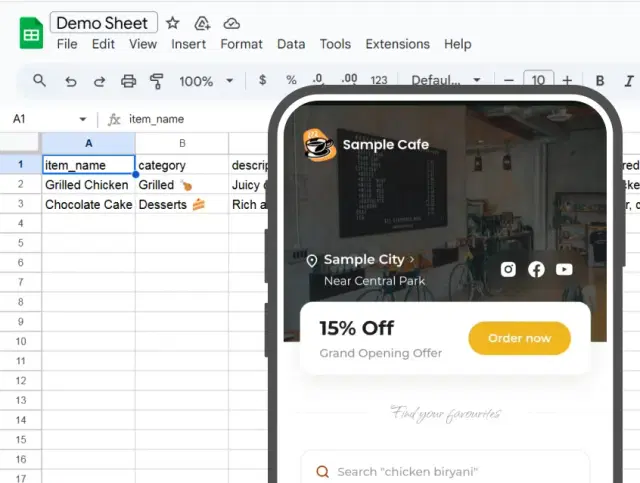
Turn your Google Sheets into a live QR code menu your customers can browse on their phones — update prices, items, and availability in seconds, from anywhere.
01
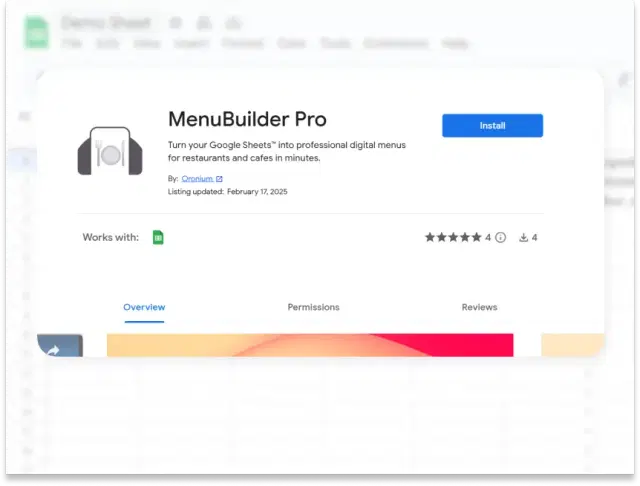
Install the Free Foodee Add-On
Open Google Sheets and add Foodee from the Add-ons menu — no coding, no tech skills needed. Your digital menu setup begins in under a minute.
02
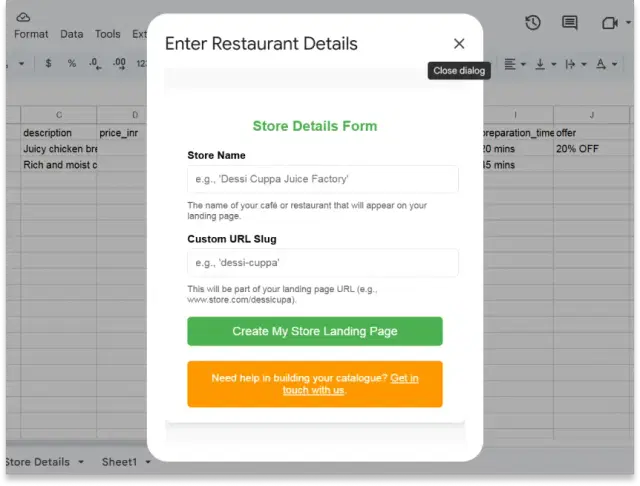
Name Your Menu & Get Your Own Link
Give your menu a name (e.g., 'Sunrise Café') and choose a custom URL like yourcafe.foodee.store. Your restaurant's digital menu page is created instantly — ready to share.
03
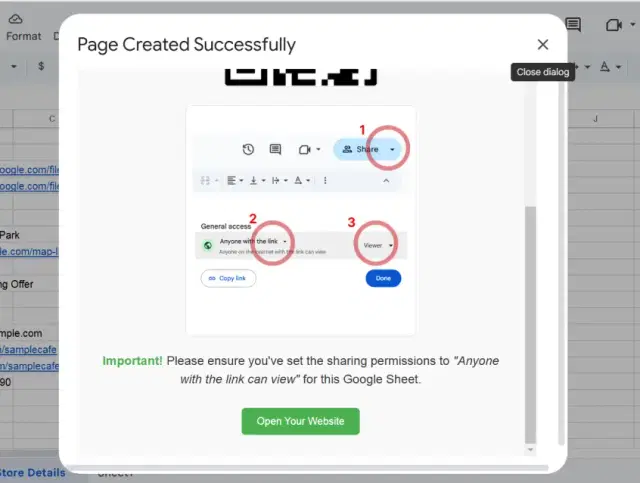
Make Your Menu Public in One Click
Set your Google Sheet to 'Anyone with the link can view.' That's it. Your live QR code menu stays online and always shows your latest items — no manual uploads ever.
04
Update Your Menu Anytime, Instantly
Change a price, add a dish, or mark something sold out — just edit your Google Sheet and your online menu updates in real time. No reprinting. No waiting. No extra cost.
Stop Paying to Reprint. Switch to a Digital Menu
Your Whole Team Can Update in Seconds.
Your Whole Team Can Update in Seconds.
Thousands of restaurants, cafes, and cloud kitchens use Foodee to run a live QR code menu — updated instantly from Google Sheets. Free to start. No contract. No tech skills needed.
🍽️ Create Your Free Digital Menu in MinutesReal Restaurants. Real Digital Menus. Live Right Now.
These are real QR code menus built by restaurant owners and cafe managers using Foodee — click any card to see a live menu in action.
Milano Restaurant
milano.foodee.storeIce Cream Shop
cafe.foodee.storeVeena's Cafe
veenascafe.foodee.storeIce Parlour
icebar.foodee.storeMomos Cafe
example.foodee.storeMilano Restaurant
milano.foodee.storeIce Cream Shop
cafe.foodee.storeVeena's Cafe
veenascafe.foodee.storeIce Parlour
icebar.foodee.storeYour Questions About Foodee, Answered
Everything restaurant owners, cafe managers, and cloud kitchen operators ask before setting up their digital menu. Still have questions? Email us at hey@oronium.com — we reply fast.
Can I try Foodee for free before paying anything?
▼Yes — Foodee is free to start with no credit card required. The free plan includes up to 3 menu categories and 20 items. Your digital menu will display a small Foodee watermark. Upgrade to Premium anytime to remove it and unlock unlimited items.
What do I get with Foodee Premium?
▼Foodee Premium costs just $3.50/month and gives you unlimited menu categories, unlimited items, no watermark on your restaurant menu, and priority support within 12 hours. Most restaurants and cafes upgrade within the first week.
Can I cancel my subscription at any time?
▼Absolutely. You can cancel Foodee Premium at any time — no questions asked, no lock-in contracts. We also offer a 10-day free trial so you can explore every premium feature completely risk-free before committing.
Do I need any technical skills to set up my digital menu?
▼None at all. If you can type into a spreadsheet, you can run Foodee. Just install the free Google Sheets add-on, enter your dishes and prices, and your QR code menu is ready to share — no coding, no designers, no IT support needed.
Will my menu work on my customers' phones?
▼Yes. Every Foodee digital menu is fully mobile-optimised and works on any smartphone or tablet. Customers simply scan your QR code or tap your menu link — no app download required on their end.
How do I add food photos, a logo, or a cover image?
▼Upload your image to Google Drive, set the sharing permission to 'Anyone with the link can view,' and paste the image link into the relevant column in your Google Sheet. Your photo will appear on your menu instantly.
How do I update my restaurant name, logo, or store details?
▼Open the 'Store Details' sheet inside the Foodee add-on and update any field directly. Changes appear on your live digital menu in real time — no republishing or reprinting needed.
Why is my menu page stuck on a loading screen?
▼This almost always means your Google Sheet's sharing permission isn't set correctly. Open your sheet, click 'Share,' and make sure 'Anyone with the link can view' is selected. Your menu will load immediately after that.
How do I get help or request a customisation?
▼Free plan users can reach our support team by email. Premium users get priority support with a guaranteed 12-hour response time. For custom design requests or white-label menus, contact us directly at hey@oronium.com.